
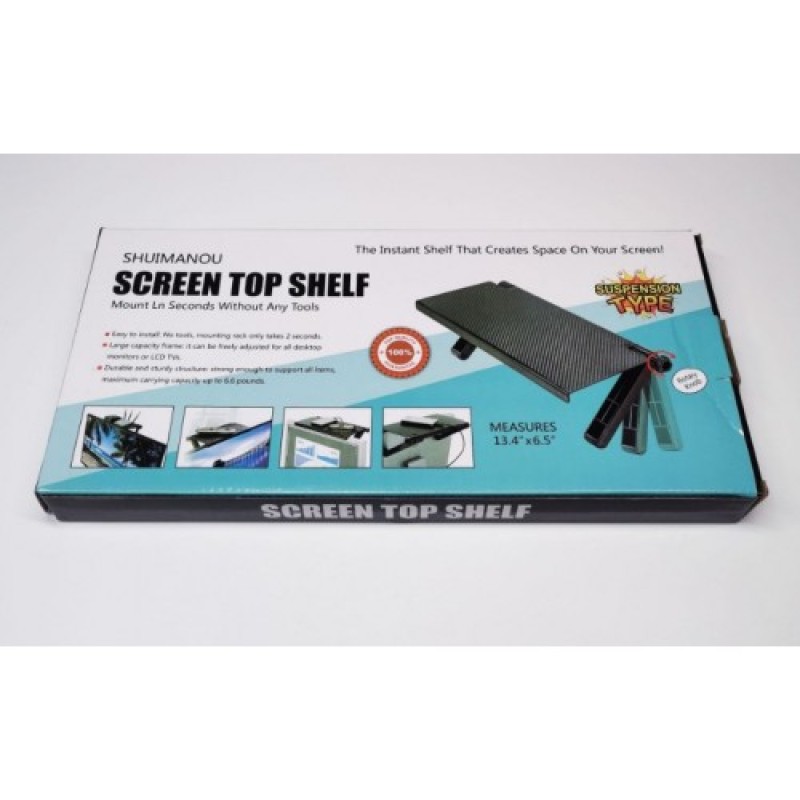
Shelf Rack for Monitor and TV (16 x 33cm)
- Product Code: CAS042
- EAN: 202007240064
- Availability: 100
Shelf Rack for Monitor and TV Top Storage (16 × 33 cm)
Utilize unused vertical space above your screen and declutter your entertainment console or workstation with the Shelf Rack for Monitor and TV Top Storage (16 × 33 cm). Designed with dual fully adjustable supporting legs and a wide, stable shelf platform, this clever screen caddy mounts directly on top of virtually any flat-screen television or computer monitor in seconds without requiring tools, screws, or adhesives.
Operating 100% mechanically (No DC power adapter, electrical cords, or hardware drilling required), it provides an elevated platform for media streaming boxes, remote controls, Wi-Fi routers, soundbars, game controllers, and desk accessories. Built from durable, heat-resistant ABS thermoplastic with a textured anti-slip surface, it keeps essential devices accessible and safe while maintaining a clean, minimalist setup.
Key Features & Specifications
-
Product Type: Screen-Top Organizer Caddy / Adjustable Top Shelf Rack.
-
Platform Dimensions & Form Factor:
-
Top Surface Area: Approx. 33 cm (Width) × 16 cm (Depth).
-
Wide, low-profile ledge designed to hold items securely without obstructing the front viewing bezel or screen display.
-
-
Zero-Tool Installation & Easy Adjustment:
-
Dual articulated rear support legs adjust smoothly through a full rotary angle to match the rear contour of flat or curved screens.
-
Easy-twist rotary locking knobs secure the supporting legs firmly against the back of the TV or monitor casing.
-
Installs and uninstalls in seconds without damaging screen bezels, drilling into walls, or leaving sticky adhesive residue.
-
-
Anti-Slip & Protective Surface Detailing:
-
Textured, dot-matrix surface pattern prevents remotes, routers, and lightweight accessories from sliding off.
-
Raised front retaining lip keeps mounted items from slipping forward over the front edge.
-
Soft rubber-padded leg contact points protect the back panel of your monitor or TV from scuffs and scratches.
-
-
Effective Passive Cable & Heat Management:
-
Rear/side cutout spacing allows power and HDMI cables from media boxes or webcams to pass cleanly behind the screen.
-
Thermally stable design provides natural ventilation, preventing heat buildup around electronics like routers and TV boxes.
-
-
Durable & Sturdy Load Capacity:
-
Molded from high-density, impact-resistant ABS engineering plastic.
-
Sturdy cantilever balance supports items weighing up to 2 kg to 3 kg when properly leveled and locked.
-
-
100% Non-Electric & Cord-Free (No DC):
-
Fully mechanical gravity-and-friction balance structure.
-
Zero reliance on DC power supplies, internal batteries, or wiring.
-
Broad Universal Applications & Target Uses
-
Living Room TV Organization: Perfect for holding streaming devices (Apple TV, Chromecast, Roku, Fire TV boxes), cable receivers, soundbar remotes, and air-con controllers off the main entertainment unit.
-
Office & Work-From-Home Desks: Mount webcams, desk microphones, small digital clocks, sticky notes, or spectacles above your PC monitor to maximize desk space.
-
Gaming Battle Stations: Hold wireless game controllers, headset receivers, figurines, or ambient light bars directly above gaming monitors.
-
Home Networking & Wi-Fi Boosters: Elevated placement above TVs or monitors helps improve Wi-Fi router and streaming box signal reception by minimizing floor and furniture interference.
-
Decorative Accents: Display small succulents, family photos, action figures, or desk ornaments in compact rooms where shelf space is limited.
Quick 4-Step Setup & Installation Guide
-
Loosen Leg Knobs: Turn the rotary adjustment knobs on both legs counter-clockwise to allow the legs to swing freely.
-
Position Shelf on Screen: Rest the front lip of the shelf flat along the top edge of your monitor or TV bezel.
-
Angle Rear Legs: Swing the two support legs back until their padded feet rest firmly against the back chassis of the television or display.
-
Tighten & Level: Ensure the shelf surface is completely level and tighten both knobs clockwise to lock the legs firmly into place before placing items on top.